
24879
How to Use BLoC for Flutter State Management? An In-Depth Tutorial
7 min read
24879
7 min read
With Flutter development, you have several state management libraries such as BLoC (Business logic component), MobX, Cube, GetX, Inherited Widget, etc. In this blog, we will talk about one of the most popular libraries BLoC, which is recommended by Google as well.
Here, we will see in detail about state management using BLoC and how you can set it up for use.
So without further ado, let’s check!
In Flutter BLoC, everything is a widget. The widget can be classified into two categories:
To manage the large size of applications we must need to manage states. There are many state management libraries in flutter such as Provider, BLoC, Redux, GetX Etc.
In this blog, we will talk about BLoC Architecture.
BLoC stands for Business Logic Components. It’s a state management system for Flutter recommended by Google developers. It helps in managing the state and makes access to data from a central place in your project.
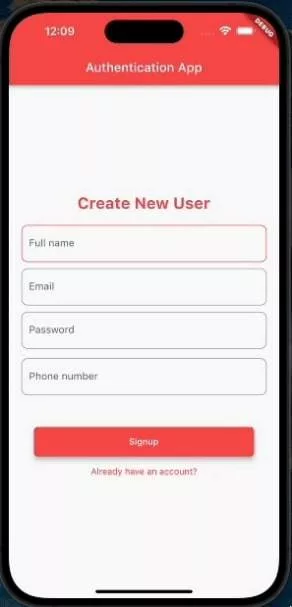
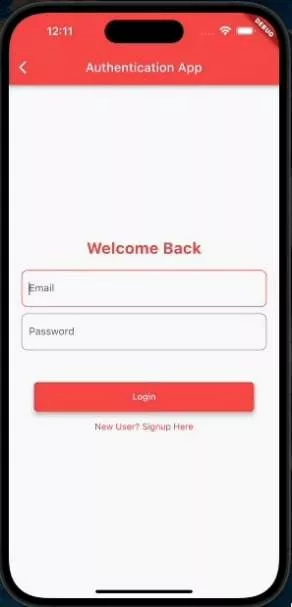
We will build an authentication application; create a new user and log in with credentials. You can refer below GIF for the same.
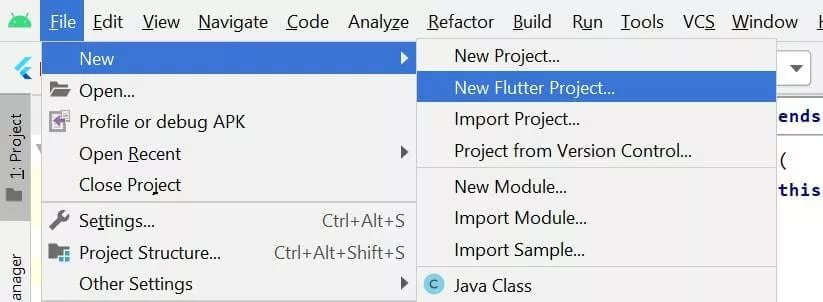
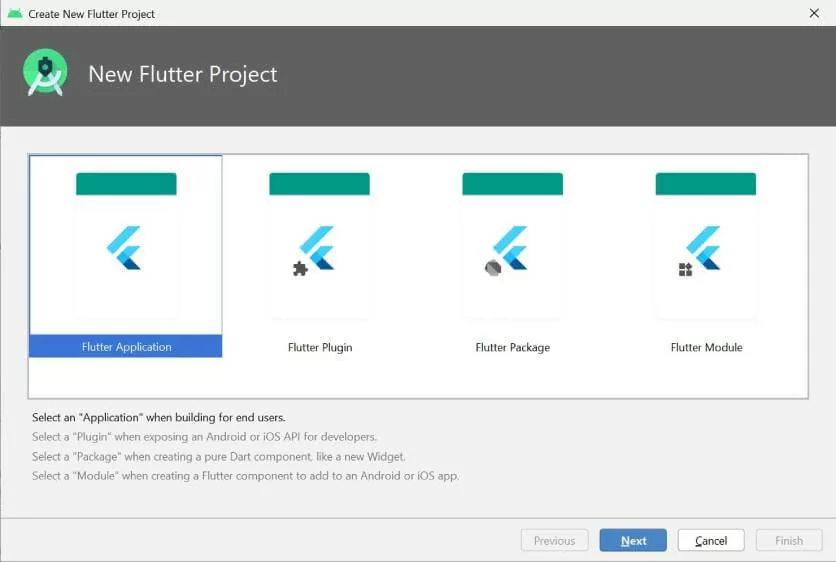
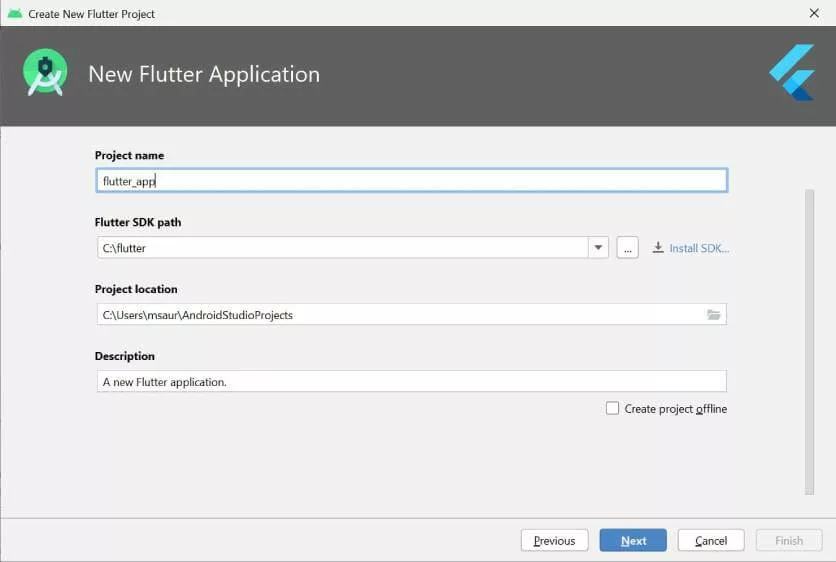
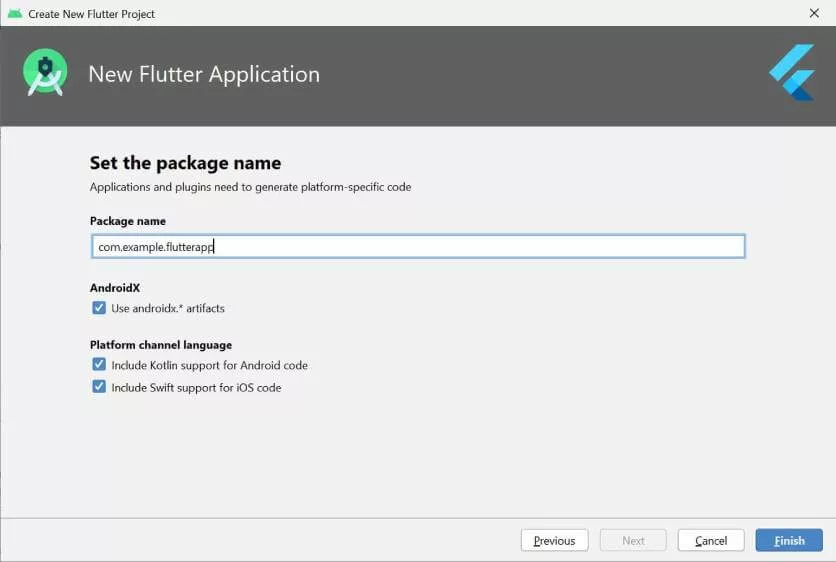
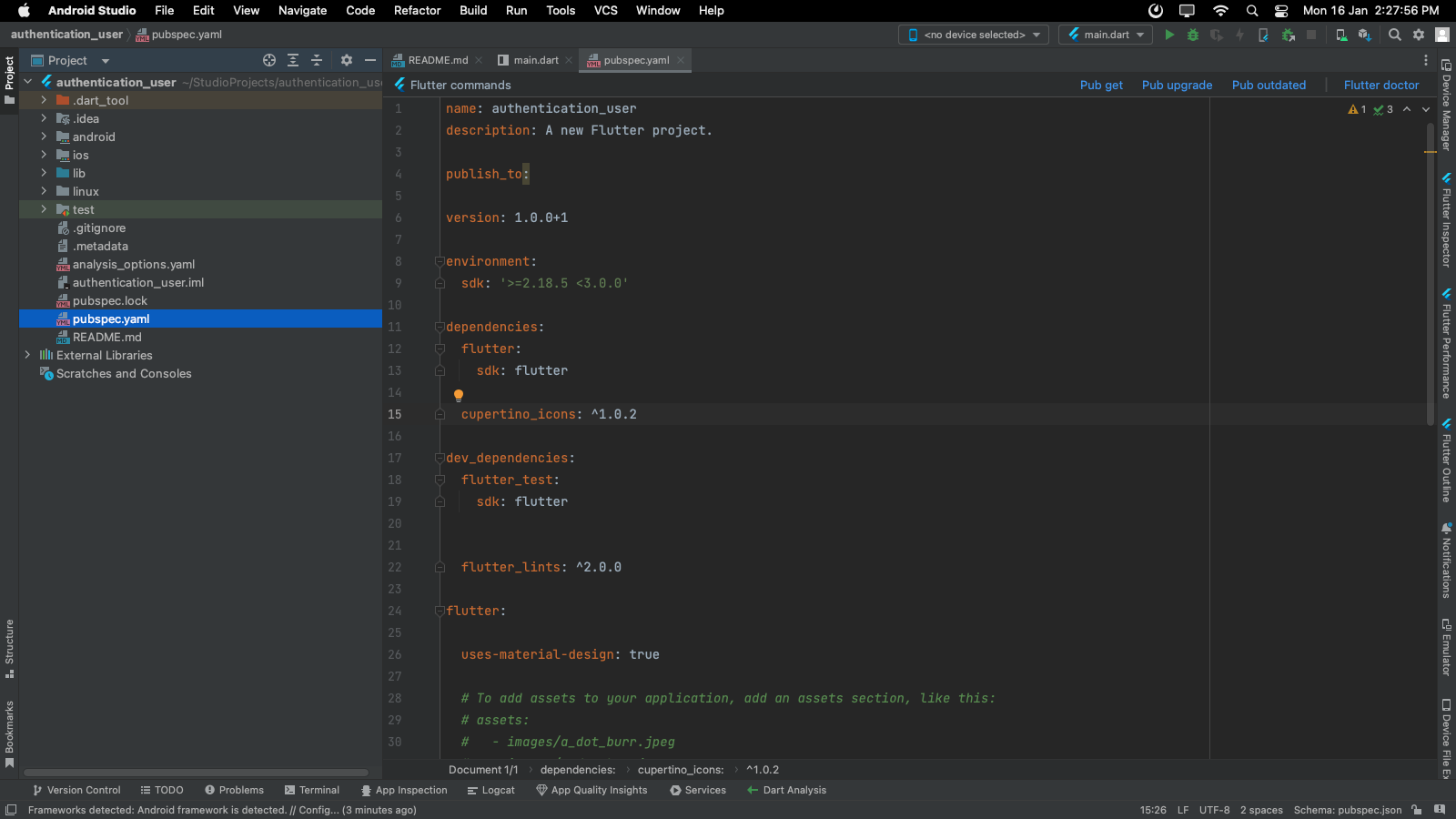
It will give you the option for a generation bloc for your project.
dependencies:
flutter_bloc: ^8.1.1
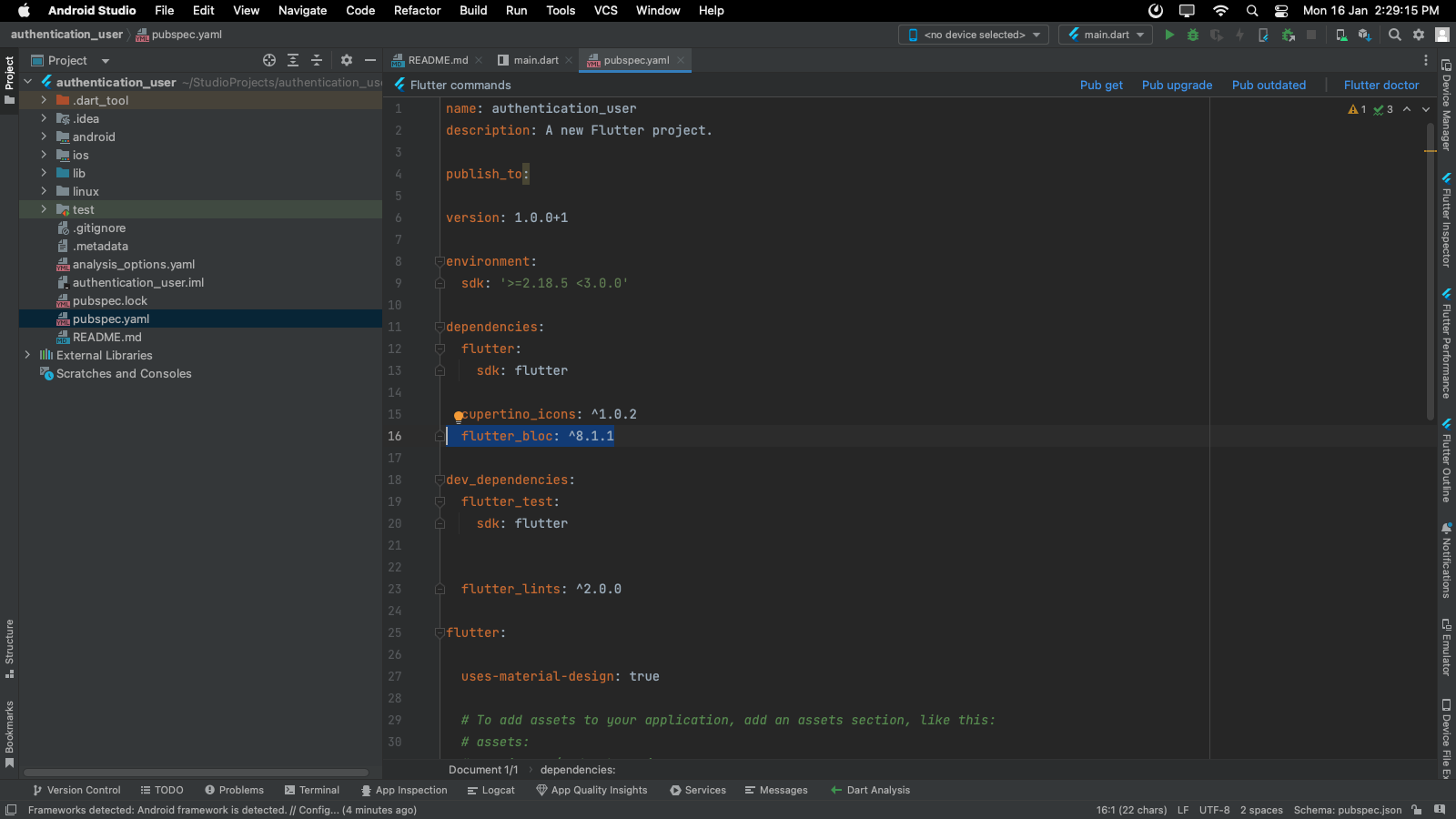
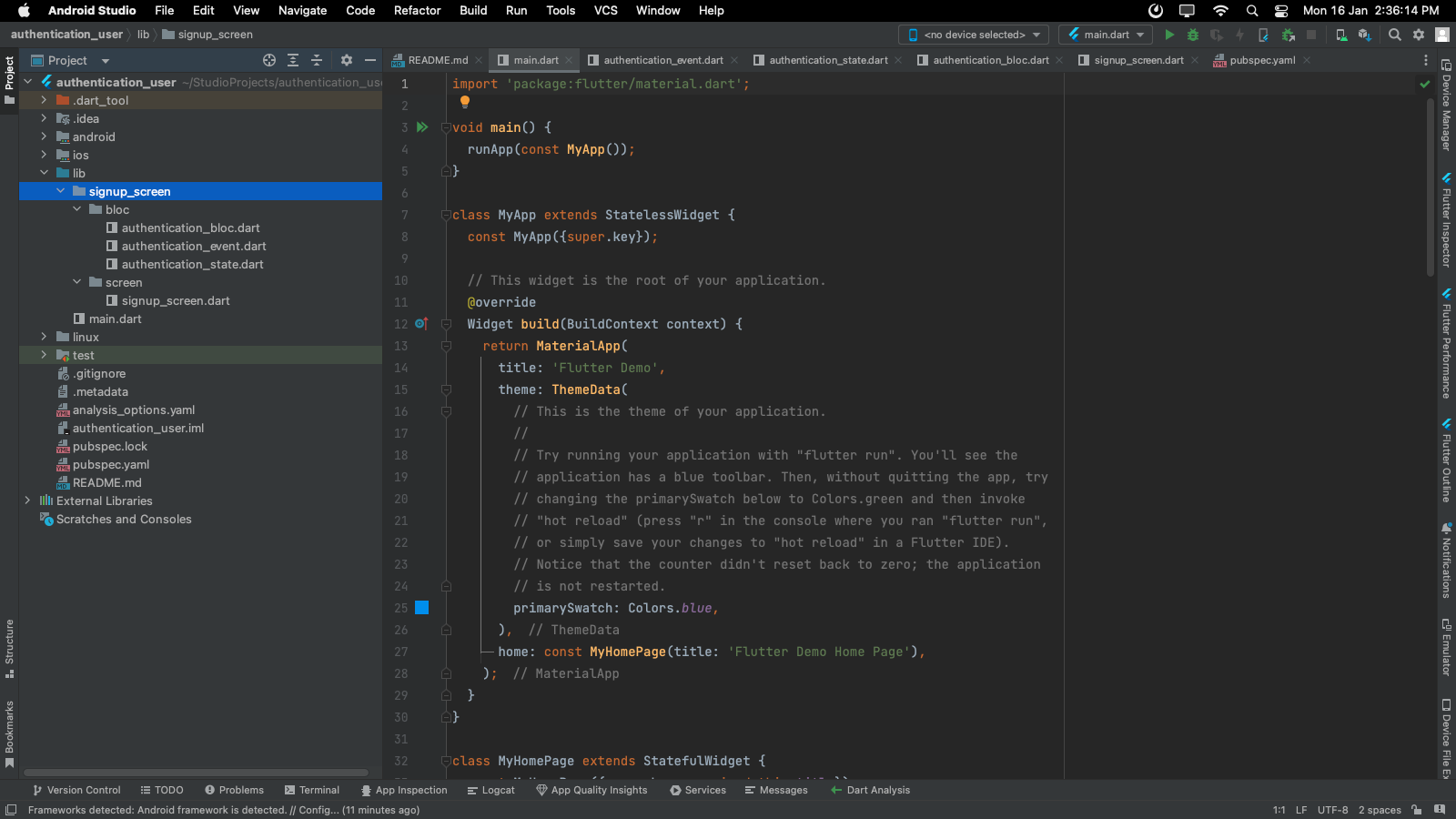
Create the same file for the login screen also.
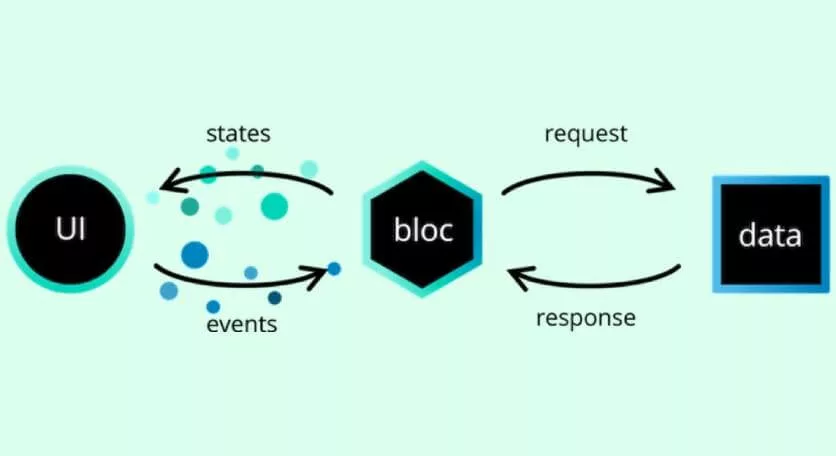
Any Event which is performed in UI is managed in the bloc. Firstly, bloc requests data from database or backend side, and then bloc emits state according to events as Shown in the image below.
part of 'signup_bloc.dart';
@immutable
abstract class SignupEvent {}
//GetSignup Event for Creating New User
class GetSignup extends SignupEvent {
String? fullname;
String? email;
String? password;
String? phoneNumber;
GetSignup({this.email, this.password, this.fullname, this.phoneNumber}); }
Here we have created a GetSignup, which will be fired when a button is clicked. We have an abstract SignupEvent class because Bloc expects a single event to be added to the stream.
There can be multiple events in an app, we create an abstract class and extend it whenever we want to create any new event for handling and passing multiple events to the bloc.
part of 'signup_bloc.dart';
@immutable
abstract class SignupState {}
class SignupInitial extends SignupState {}
class SignupValidation extends SignupState {
String? value;
SignupValidation(this.value);
}
class SignupLoading extends SignupState {}
class SignupLoaded extends SignupState {}
class SignupError extends SignupState {
String? error;
SignupError(this.error);
}
Here we have 5 different states which emit one by one as defined in SignupBloc.
import ‘package:bloc/bloc.dart’;
import ‘package:flutter/material.dart’;
import ‘package:shared_preferences/shared_preferences.dart’;
part ‘signup_event.dart’;
part ‘signup_state.dart’;
class SignupBloc extends Bloc<SignupEvent, SignupState> {  SignupBloc() : super(SignupInitial()) {
on((event, emit) async {
if (event is GetSignup) {
String value = validation(event);
if (value != ”) {
emit(SignupValidation(value));
} else {
emit(SignupLoading());
//holds the user for below given time
await Future.delayed(const Duration(seconds: 0), () async {  //storing data in SharedPreferences
SharedPreferences prefs = await SharedPreferences.getInstance();  prefs.setString(‘email’, ”${event.email}”);
prefs.setString(‘password’, ”${event.password}”);  emit(SignupLoaded());
}).onError((error, stackTrace) {
emit(SignupError(error.toString()));
});
}
}
});
}
}
//validation for text field
String validation(GetSignup data) {
if (data.fullname?.isEmpty == true) {
return ‘Please Enter Your Fullname’;
}
if (data.email?.isEmpty == true) {
return ‘Please Enter Your Email-id’;
}
if (data.password?.isEmpty == true) {
return ‘Please Enter Your Password’;
}
if (data.phoneNumber?.isEmpty == true) {
return ‘Please Enter Your Contact Number’;
}
return ”;
}
Explanation
This is the part that contains the business logic of our application.
import ‘package:authentication_user/home_screen/screen/home_screen.dart’; import ‘package:authentication_user/login_screen/screen/login_screen.dart’; import ‘package:authentication_user/signup_screen/bloc/signup_bloc.dart’; import ‘package:flutter/material.dart’;
import ‘package:flutter_bloc/flutter_bloc.dart’;
class SignupScreen extends StatefulWidget {
@override
State createState() => _SignupScreenState(); }
class _SignupScreenState extends State {
//instance of LoginBloc
final _signupBloc = SignupBloc();
//controller for text field
TextEditingController fullNameController = TextEditingController();  TextEditingController emailController = TextEditingController();  TextEditingController passwordController = TextEditingController();  TextEditingController phoneNumberController = TextEditingController();
@override
Widget build(BuildContext context) {
return BlocProvider(
//providing signup bloc
create: (context) {
return _signupBloc;
},
child: BlocListener<SignupBloc, SignupState>(
//providing signup bloc listener
listener: (context, state) {
if (state is SignupValidation) {
ScaffoldMessenger.of(context).showSnackBar(SnackBar(  content: Text(”${state.value}”),
));
}
if (state is SignupLoading) {}
if (state is SignupLoaded) {
//if successfully created user then loaded state called  ScaffoldMessenger.of(context).showSnackBar(SnackBar(  content: Text(“Successfully Registered New User”),  ));
Navigator.push(context, MaterialPageRoute(  builder: (context) {
return HomeScreen(); //push to HomeScreen  },
));
}
},
child: Scaffold(
appBar: AppBar(
title: Text(‘Authentication App’),
backgroundColor: Colors.redAccent,
),
body: Column(
mainAxisAlignment: MainAxisAlignment.center,  children: [
Container(
child: Text(
‘Create New User’,
style: TextStyle(
fontSize: 25,
color: Colors.redAccent,
fontWeight: FontWeight.bold),
),
),
Container(
padding: EdgeInsets.symmetric(horizontal: 20),  child: Column(
children: [
SizedBox(
height: 20,
),
TextField(
textInputAction: TextInputAction.next,  keyboardType: TextInputType.name,  controller: fullNameController,
decoration: InputDecoration(
hintText: ‘Full name’,
// errorText: validate ? errorText : null,  focusedBorder: OutlineInputBorder(
borderSide: BorderSide(color: Colors.redAccent),  borderRadius: BorderRadius.circular(10)),  border: OutlineInputBorder(
borderSide: BorderSide(color: Colors.black38),  borderRadius: BorderRadius.circular(10)),  ),
),
SizedBox(
height: 10,
),
TextField(
textInputAction: TextInputAction.next,  keyboardType: TextInputType.emailAddress,  controller: emailController,
decoration: InputDecoration(
hintText: ‘Email’,
// errorText: validate ? errorText : null,  focusedBorder: OutlineInputBorder(  borderSide: BorderSide(color: Colors.redAccent),  borderRadius: BorderRadius.circular(10),  ),
border: OutlineInputBorder(
borderSide: BorderSide(color: Colors.black38),  borderRadius: BorderRadius.circular(10)),  ),
),
SizedBox(
height: 10,
),
TextField(
textInputAction: TextInputAction.next,  keyboardType: TextInputType.visiblePassword,  controller: passwordController,
decoration: InputDecoration(
hintText: ‘Password’,
// errorText: validate ? errorText : null,  focusedBorder: OutlineInputBorder(  borderSide: BorderSide(color: Colors.redAccent),  borderRadius: BorderRadius.circular(10)),
border: OutlineInputBorder(
borderSide: BorderSide(color: Colors.black38),  borderRadius: BorderRadius.circular(10)),  ),
),
SizedBox(
height: 15,
),
TextField(
textInputAction: TextInputAction.done,  keyboardType: TextInputType.phone,  controller: phoneNumberController,
decoration: InputDecoration(
hintText: ‘Phone number’,
// errorText: validate ? errorText : null,  focusedBorder: OutlineInputBorder(  borderSide: BorderSide(color: Colors.redAccent),  borderRadius: BorderRadius.circular(10)),
border: OutlineInputBorder(
borderSide: BorderSide(color: Colors.black38),  borderRadius: BorderRadius.circular(10)),  )),
SizedBox(
height: 30,
),
Container(
padding: EdgeInsets.all(20),
child: Column(
children: [
Row(
children: [
Expanded(
child: ElevatedButton(
style: ButtonStyle(
elevation: MaterialStatePropertyAll(6),  backgroundColor:
MaterialStatePropertyAll(  Colors.redAccent),
shape: MaterialStatePropertyAll(  RoundedRectangleBorder(  borderRadius:
BorderRadius.circular(6)))),  onPressed: () {
setState(() {
//adding event on widget onPressed Method  _signupBloc.add(GetSignup(  email: emailController.text,  fullname: fullNameController.text,  password: passwordController.text,  phoneNumber:
phoneNumberController.text));  });
},
child: Container(
padding: EdgeInsets.symmetric(
horizontal: 20, vertical: 15),
child: Text(
‘Signup’,
))),
),
],
),
SizedBox(
height: 15,
),
GestureDetector(
onTap: () {
Navigator.push(context, MaterialPageRoute(  builder: (context) {
return LoginScreen();
},
));
},
child: Text(
‘Already have an account?’,
style: TextStyle(color: Colors.redAccent),  ),
),
],
),
)
],
),
),
],
),
),
),
);
}
}
BlocProvider(…)
we use it to provide an instance of our bloc by placing it just below the root of the application so that it is accessible throughout it.
It is the portion where everything management of states happens.
Read also: Everything about Flutter 3
part of 'login_bloc.dart';
@immutable
abstract class LoginEvent {}
//event for GetUserLogin
class GetLogin extends LoginEvent {
String? email;
String? password;
GetLogin({this.email, this.password});
}
Here we have created a GetLogin, which will be fired when a button is clicked.
part of 'login_bloc.dart';
@immutable
abstract class LoginState {}
class LoginInitial extends LoginState {}
class LoginValidation extends LoginState {
String? value;
LoginValidation(this.value);
}
class LoginLoading extends LoginState {}
class LoginLoaded extends LoginState {}
class LoginError extends LoginState {
String? error;
LoginError(this.error);
}
Here we have 5 different states which emit one by one by defined in LoginBloc.
import ‘package:bloc/bloc.dart’;
import ‘package:flutter/material.dart’;
import ‘package:shared_preferences/shared_preferences.dart’; part ‘login_event.dart’;
part ‘login_state.dart’;
String? sfEmail;
String? sfPassword;
class LoginBloc extends Bloc<LoginEvent, LoginState> {  LoginBloc() : super(LoginInitial()) {
//calling function to get value by SharedPreferences  getStringValuesSF();
on((event, emit) async {
if (event is GetLogin) {
String value = validation(event);
if (value != ”) {
emit(LoginValidation(value.toString()));
} else {
emit(LoginLoading());
//holds the user for below given time
await Future.delayed(const Duration(seconds: 3), () async {  //if credentials matches then loaded state emitted  if (event.email == sfEmail && event.password == sfPassword) {  emit(LoginLoaded());
}
}).onError((error, stackTrace) {
emit(LoginError(error.toString()));
});
}
}
});
}
}
//validation for text fields
String validation(GetLogin data) {
if (data.email?.isEmpty == true) {
return ‘Please Enter Your Email-id’;
}
if (data.password?.isEmpty == true) {
return ‘Please Enter Your Password’;
}
if (data.email != sfEmail) {
return ‘Please enter your valid email id’;
}
if (data.password != sfPassword) {
return ‘wrong password’;
}
return ”;
}
//function for getting value from SharedPreferences getStringValuesSF() async {
SharedPreferences prefs = await SharedPreferences.getInstance();  sfEmail = prefs.getString(‘email’).toString();
sfPassword = prefs.getString(‘password’).toString(); }
Explanation
import ‘package:authentication_user/home_screen/screen/home_screen.dart’; import ‘package:authentication_user/login_screen/bloc/login_bloc.dart’; import ‘package:flutter/material.dart’;
import ‘package:flutter_bloc/flutter_bloc.dart’;
class LoginScreen extends StatefulWidget {
@override
State createState() => _LoginScreenState(); }
class _LoginScreenState extends State {
//instance of Login Bloc
final _loginBloc = LoginBloc();
//controllers for text fields
TextEditingController emailController = TextEditingController();  TextEditingController passwordController = TextEditingController();
@override
Widget build(BuildContext context) {
return BlocProvider(
//providing login bloc
create: (context) {
return _loginBloc;
},
child: BlocListener<LoginBloc, LoginState>(
//providing listener for login bloc
listener: (context, state) {
if (state is LoginValidation) {
ScaffoldMessenger.of(context).showSnackBar(SnackBar(  content: Text(”${state.value}”),
));
}
if (state is LoginLoading) {}
if (state is LoginLoaded) {
//if successfully credentials matches the loaded state called  ScaffoldMessenger.of(context).showSnackBar(SnackBar(  content: Text(“Successfully Logged in”),
));
Navigator.push(context, MaterialPageRoute(
builder: (context) {
return HomeScreen(); //push to HomeScreen
},
));
}
},
child: Scaffold(
appBar: AppBar(
title: Text(‘Authentication App’),
backgroundColor: Colors.redAccent,
),
body: Column(
mainAxisAlignment: MainAxisAlignment.center,  children: [
Container(
child: Text(
‘Welcome Back’,
style: TextStyle(
fontSize: 25,
color: Colors.redAccent,
fontWeight: FontWeight.bold),
),
),
Container(
padding: EdgeInsets.symmetric(horizontal: 20),  child: Column(
children: [
SizedBox(
height: 20,
),
TextField(
textInputAction: TextInputAction.next,  keyboardType: TextInputType.emailAddress,  controller: emailController,
decoration: InputDecoration(
hintText: ‘Email’,
// errorText: validate ? errorText : null,  focusedBorder: OutlineInputBorder(  borderSide: BorderSide(color: Colors.redAccent),  borderRadius: BorderRadius.circular(10),  ),
border: OutlineInputBorder(
borderSide: BorderSide(color: Colors.black38),  borderRadius: BorderRadius.circular(10)),  ),
),
SizedBox(
height: 10,
),
TextField(
textInputAction: TextInputAction.next,  keyboardType: TextInputType.visiblePassword,  controller: passwordController,
decoration: InputDecoration(
hintText: ‘Password’,
// errorText: validate ? errorText : null,  focusedBorder: OutlineInputBorder(
borderSide: BorderSide(color: Colors.redAccent),  borderRadius: BorderRadius.circular(10)),
border: OutlineInputBorder(
borderSide: BorderSide(color: Colors.black38),  borderRadius: BorderRadius.circular(10)),  ),
),
SizedBox(
height: 30,
),
Container(
padding: EdgeInsets.all(20),
child: Column(
children: [
Row(
children: [
Expanded(
child: ElevatedButton(
style: ButtonStyle(
elevation: MaterialStatePropertyAll(6),  backgroundColor: MaterialStatePropertyAll(  Colors.redAccent),
shape: MaterialStatePropertyAll(  RoundedRectangleBorder(  borderRadius:
BorderRadius.circular(6)))),  onPressed: () {
setState(() {
//adding event on Widget OnPressed Method  _loginBloc.add(GetLogin(
email: emailController.text,
password: passwordController.text,  ));
});
},
child: Container(
padding: EdgeInsets.symmetric(  horizontal: 20, vertical: 15),
child: Text(
‘Login’,
),
),
),
),
],
),
SizedBox(
height: 15,
),
GestureDetector(
onTap: () {
Navigator.pop(context);
},
child: Text(
‘New User? Signup Here’,
style: TextStyle(color: Colors.redAccent),  ),
),
],
),
)
],
),
),
],
),
),
),
);
}
}
BlocProvider(…)
we use it to provide an instance of our bloc by placing it just below the root of the application so that it is accessible throughout it.
It is the portion where everything management of states happens.
Keep learning , keep coding 🙂
With Flutter development, you have several state management libraries such as BLoC (Business logic component), MobX, Cube, GetX, Inherited Widget, etc. In this blog, we will talk about one of the most popular libraries BLoC, which is recommended by Google as well.
Here, we will see in detail about state management using BLoC and how you can set it up for use.
So without further ado, let’s check!
In Flutter BLoC, everything is a widget. The widget can be classified into two categories:
To manage the large size of applications we must need to manage states. There are many state management libraries in flutter such as Provider, BLoC, Redux, GetX Etc.
In this blog, we will talk about BLoC Architecture.
BLoC stands for Business Logic Components. It’s a state management system for Flutter recommended by Google developers. It helps in managing the state and makes access to data from a central place in your project.
We will build an authentication application; create a new user and log in with credentials. You can refer below GIF for the same.
It will give you the option for a generation bloc for your project.
dependencies:
flutter_bloc: ^8.1.1
Create the same file for the login screen also.
Any Event which is performed in UI is managed in the bloc. Firstly, bloc requests data from database or backend side, and then bloc emits state according to events as Shown in the image below.
part of 'signup_bloc.dart';
@immutable
abstract class SignupEvent {}
//GetSignup Event for Creating New User
class GetSignup extends SignupEvent {
String? fullname;
String? email;
String? password;
String? phoneNumber;
GetSignup({this.email, this.password, this.fullname, this.phoneNumber}); }
Here we have created a GetSignup, which will be fired when a button is clicked. We have an abstract SignupEvent class because Bloc expects a single event to be added to the stream.
There can be multiple events in an app, we create an abstract class and extend it whenever we want to create any new event for handling and passing multiple events to the bloc.
part of 'signup_bloc.dart';
@immutable
abstract class SignupState {}
class SignupInitial extends SignupState {}
class SignupValidation extends SignupState {
String? value;
SignupValidation(this.value);
}
class SignupLoading extends SignupState {}
class SignupLoaded extends SignupState {}
class SignupError extends SignupState {
String? error;
SignupError(this.error);
}
Here we have 5 different states which emit one by one as defined in SignupBloc.
import ‘package:bloc/bloc.dart’;
import ‘package:flutter/material.dart’;
import ‘package:shared_preferences/shared_preferences.dart’;
part ‘signup_event.dart’;
part ‘signup_state.dart’;
class SignupBloc extends Bloc<SignupEvent, SignupState> {  SignupBloc() : super(SignupInitial()) {
on((event, emit) async {
if (event is GetSignup) {
String value = validation(event);
if (value != ”) {
emit(SignupValidation(value));
} else {
emit(SignupLoading());
//holds the user for below given time
await Future.delayed(const Duration(seconds: 0), () async {  //storing data in SharedPreferences
SharedPreferences prefs = await SharedPreferences.getInstance();  prefs.setString(‘email’, ”${event.email}”);
prefs.setString(‘password’, ”${event.password}”);  emit(SignupLoaded());
}).onError((error, stackTrace) {
emit(SignupError(error.toString()));
});
}
}
});
}
}
//validation for text field
String validation(GetSignup data) {
if (data.fullname?.isEmpty == true) {
return ‘Please Enter Your Fullname’;
}
if (data.email?.isEmpty == true) {
return ‘Please Enter Your Email-id’;
}
if (data.password?.isEmpty == true) {
return ‘Please Enter Your Password’;
}
if (data.phoneNumber?.isEmpty == true) {
return ‘Please Enter Your Contact Number’;
}
return ”;
}
Explanation
This is the part that contains the business logic of our application.
import ‘package:authentication_user/home_screen/screen/home_screen.dart’; import ‘package:authentication_user/login_screen/screen/login_screen.dart’; import ‘package:authentication_user/signup_screen/bloc/signup_bloc.dart’; import ‘package:flutter/material.dart’;
import ‘package:flutter_bloc/flutter_bloc.dart’;
class SignupScreen extends StatefulWidget {
@override
State createState() => _SignupScreenState(); }
class _SignupScreenState extends State {
//instance of LoginBloc
final _signupBloc = SignupBloc();
//controller for text field
TextEditingController fullNameController = TextEditingController();  TextEditingController emailController = TextEditingController();  TextEditingController passwordController = TextEditingController();  TextEditingController phoneNumberController = TextEditingController();
@override
Widget build(BuildContext context) {
return BlocProvider(
//providing signup bloc
create: (context) {
return _signupBloc;
},
child: BlocListener<SignupBloc, SignupState>(
//providing signup bloc listener
listener: (context, state) {
if (state is SignupValidation) {
ScaffoldMessenger.of(context).showSnackBar(SnackBar(  content: Text(”${state.value}”),
));
}
if (state is SignupLoading) {}
if (state is SignupLoaded) {
//if successfully created user then loaded state called  ScaffoldMessenger.of(context).showSnackBar(SnackBar(  content: Text(“Successfully Registered New User”),  ));
Navigator.push(context, MaterialPageRoute(  builder: (context) {
return HomeScreen(); //push to HomeScreen  },
));
}
},
child: Scaffold(
appBar: AppBar(
title: Text(‘Authentication App’),
backgroundColor: Colors.redAccent,
),
body: Column(
mainAxisAlignment: MainAxisAlignment.center,  children: [
Container(
child: Text(
‘Create New User’,
style: TextStyle(
fontSize: 25,
color: Colors.redAccent,
fontWeight: FontWeight.bold),
),
),
Container(
padding: EdgeInsets.symmetric(horizontal: 20),  child: Column(
children: [
SizedBox(
height: 20,
),
TextField(
textInputAction: TextInputAction.next,  keyboardType: TextInputType.name,  controller: fullNameController,
decoration: InputDecoration(
hintText: ‘Full name’,
// errorText: validate ? errorText : null,  focusedBorder: OutlineInputBorder(
borderSide: BorderSide(color: Colors.redAccent),  borderRadius: BorderRadius.circular(10)),  border: OutlineInputBorder(
borderSide: BorderSide(color: Colors.black38),  borderRadius: BorderRadius.circular(10)),  ),
),
SizedBox(
height: 10,
),
TextField(
textInputAction: TextInputAction.next,  keyboardType: TextInputType.emailAddress,  controller: emailController,
decoration: InputDecoration(
hintText: ‘Email’,
// errorText: validate ? errorText : null,  focusedBorder: OutlineInputBorder(  borderSide: BorderSide(color: Colors.redAccent),  borderRadius: BorderRadius.circular(10),  ),
border: OutlineInputBorder(
borderSide: BorderSide(color: Colors.black38),  borderRadius: BorderRadius.circular(10)),  ),
),
SizedBox(
height: 10,
),
TextField(
textInputAction: TextInputAction.next,  keyboardType: TextInputType.visiblePassword,  controller: passwordController,
decoration: InputDecoration(
hintText: ‘Password’,
// errorText: validate ? errorText : null,  focusedBorder: OutlineInputBorder(  borderSide: BorderSide(color: Colors.redAccent),  borderRadius: BorderRadius.circular(10)),
border: OutlineInputBorder(
borderSide: BorderSide(color: Colors.black38),  borderRadius: BorderRadius.circular(10)),  ),
),
SizedBox(
height: 15,
),
TextField(
textInputAction: TextInputAction.done,  keyboardType: TextInputType.phone,  controller: phoneNumberController,
decoration: InputDecoration(
hintText: ‘Phone number’,
// errorText: validate ? errorText : null,  focusedBorder: OutlineInputBorder(  borderSide: BorderSide(color: Colors.redAccent),  borderRadius: BorderRadius.circular(10)),
border: OutlineInputBorder(
borderSide: BorderSide(color: Colors.black38),  borderRadius: BorderRadius.circular(10)),  )),
SizedBox(
height: 30,
),
Container(
padding: EdgeInsets.all(20),
child: Column(
children: [
Row(
children: [
Expanded(
child: ElevatedButton(
style: ButtonStyle(
elevation: MaterialStatePropertyAll(6),  backgroundColor:
MaterialStatePropertyAll(  Colors.redAccent),
shape: MaterialStatePropertyAll(  RoundedRectangleBorder(  borderRadius:
BorderRadius.circular(6)))),  onPressed: () {
setState(() {
//adding event on widget onPressed Method  _signupBloc.add(GetSignup(  email: emailController.text,  fullname: fullNameController.text,  password: passwordController.text,  phoneNumber:
phoneNumberController.text));  });
},
child: Container(
padding: EdgeInsets.symmetric(
horizontal: 20, vertical: 15),
child: Text(
‘Signup’,
))),
),
],
),
SizedBox(
height: 15,
),
GestureDetector(
onTap: () {
Navigator.push(context, MaterialPageRoute(  builder: (context) {
return LoginScreen();
},
));
},
child: Text(
‘Already have an account?’,
style: TextStyle(color: Colors.redAccent),  ),
),
],
),
)
],
),
),
],
),
),
),
);
}
}
BlocProvider(…)
we use it to provide an instance of our bloc by placing it just below the root of the application so that it is accessible throughout it.
It is the portion where everything management of states happens.
Read also: Everything about Flutter 3
part of 'login_bloc.dart';
@immutable
abstract class LoginEvent {}
//event for GetUserLogin
class GetLogin extends LoginEvent {
String? email;
String? password;
GetLogin({this.email, this.password});
}
Here we have created a GetLogin, which will be fired when a button is clicked.
part of 'login_bloc.dart';
@immutable
abstract class LoginState {}
class LoginInitial extends LoginState {}
class LoginValidation extends LoginState {
String? value;
LoginValidation(this.value);
}
class LoginLoading extends LoginState {}
class LoginLoaded extends LoginState {}
class LoginError extends LoginState {
String? error;
LoginError(this.error);
}
Here we have 5 different states which emit one by one by defined in LoginBloc.
import ‘package:bloc/bloc.dart’;
import ‘package:flutter/material.dart’;
import ‘package:shared_preferences/shared_preferences.dart’; part ‘login_event.dart’;
part ‘login_state.dart’;
String? sfEmail;
String? sfPassword;
class LoginBloc extends Bloc<LoginEvent, LoginState> {  LoginBloc() : super(LoginInitial()) {
//calling function to get value by SharedPreferences  getStringValuesSF();
on((event, emit) async {
if (event is GetLogin) {
String value = validation(event);
if (value != ”) {
emit(LoginValidation(value.toString()));
} else {
emit(LoginLoading());
//holds the user for below given time
await Future.delayed(const Duration(seconds: 3), () async {  //if credentials matches then loaded state emitted  if (event.email == sfEmail && event.password == sfPassword) {  emit(LoginLoaded());
}
}).onError((error, stackTrace) {
emit(LoginError(error.toString()));
});
}
}
});
}
}
//validation for text fields
String validation(GetLogin data) {
if (data.email?.isEmpty == true) {
return ‘Please Enter Your Email-id’;
}
if (data.password?.isEmpty == true) {
return ‘Please Enter Your Password’;
}
if (data.email != sfEmail) {
return ‘Please enter your valid email id’;
}
if (data.password != sfPassword) {
return ‘wrong password’;
}
return ”;
}
//function for getting value from SharedPreferences getStringValuesSF() async {
SharedPreferences prefs = await SharedPreferences.getInstance();  sfEmail = prefs.getString(‘email’).toString();
sfPassword = prefs.getString(‘password’).toString(); }
Explanation
import ‘package:authentication_user/home_screen/screen/home_screen.dart’; import ‘package:authentication_user/login_screen/bloc/login_bloc.dart’; import ‘package:flutter/material.dart’;
import ‘package:flutter_bloc/flutter_bloc.dart’;
class LoginScreen extends StatefulWidget {
@override
State createState() => _LoginScreenState(); }
class _LoginScreenState extends State {
//instance of Login Bloc
final _loginBloc = LoginBloc();
//controllers for text fields
TextEditingController emailController = TextEditingController();  TextEditingController passwordController = TextEditingController();
@override
Widget build(BuildContext context) {
return BlocProvider(
//providing login bloc
create: (context) {
return _loginBloc;
},
child: BlocListener<LoginBloc, LoginState>(
//providing listener for login bloc
listener: (context, state) {
if (state is LoginValidation) {
ScaffoldMessenger.of(context).showSnackBar(SnackBar(  content: Text(”${state.value}”),
));
}
if (state is LoginLoading) {}
if (state is LoginLoaded) {
//if successfully credentials matches the loaded state called  ScaffoldMessenger.of(context).showSnackBar(SnackBar(  content: Text(“Successfully Logged in”),
));
Navigator.push(context, MaterialPageRoute(
builder: (context) {
return HomeScreen(); //push to HomeScreen
},
));
}
},
child: Scaffold(
appBar: AppBar(
title: Text(‘Authentication App’),
backgroundColor: Colors.redAccent,
),
body: Column(
mainAxisAlignment: MainAxisAlignment.center,  children: [
Container(
child: Text(
‘Welcome Back’,
style: TextStyle(
fontSize: 25,
color: Colors.redAccent,
fontWeight: FontWeight.bold),
),
),
Container(
padding: EdgeInsets.symmetric(horizontal: 20),  child: Column(
children: [
SizedBox(
height: 20,
),
TextField(
textInputAction: TextInputAction.next,  keyboardType: TextInputType.emailAddress,  controller: emailController,
decoration: InputDecoration(
hintText: ‘Email’,
// errorText: validate ? errorText : null,  focusedBorder: OutlineInputBorder(  borderSide: BorderSide(color: Colors.redAccent),  borderRadius: BorderRadius.circular(10),  ),
border: OutlineInputBorder(
borderSide: BorderSide(color: Colors.black38),  borderRadius: BorderRadius.circular(10)),  ),
),
SizedBox(
height: 10,
),
TextField(
textInputAction: TextInputAction.next,  keyboardType: TextInputType.visiblePassword,  controller: passwordController,
decoration: InputDecoration(
hintText: ‘Password’,
// errorText: validate ? errorText : null,  focusedBorder: OutlineInputBorder(
borderSide: BorderSide(color: Colors.redAccent),  borderRadius: BorderRadius.circular(10)),
border: OutlineInputBorder(
borderSide: BorderSide(color: Colors.black38),  borderRadius: BorderRadius.circular(10)),  ),
),
SizedBox(
height: 30,
),
Container(
padding: EdgeInsets.all(20),
child: Column(
children: [
Row(
children: [
Expanded(
child: ElevatedButton(
style: ButtonStyle(
elevation: MaterialStatePropertyAll(6),  backgroundColor: MaterialStatePropertyAll(  Colors.redAccent),
shape: MaterialStatePropertyAll(  RoundedRectangleBorder(  borderRadius:
BorderRadius.circular(6)))),  onPressed: () {
setState(() {
//adding event on Widget OnPressed Method  _loginBloc.add(GetLogin(
email: emailController.text,
password: passwordController.text,  ));
});
},
child: Container(
padding: EdgeInsets.symmetric(  horizontal: 20, vertical: 15),
child: Text(
‘Login’,
),
),
),
),
],
),
SizedBox(
height: 15,
),
GestureDetector(
onTap: () {
Navigator.pop(context);
},
child: Text(
‘New User? Signup Here’,
style: TextStyle(color: Colors.redAccent),  ),
),
],
),
)
],
),
),
],
),
),
),
);
}
}
BlocProvider(…)
we use it to provide an instance of our bloc by placing it just below the root of the application so that it is accessible throughout it.
It is the portion where everything management of states happens.
Keep learning , keep coding 🙂
Artificial Intelligence (AI)
Development
10811

By Devik Gondaliya

Development
ERP
2796
By Devik Gondaliya

Artificial Intelligence (AI)
Development
52808
By Devik Gondaliya
You are at the right place.
Projects Completed
Technical Experts
Happy Clients
Years of Experience
Book a free consultation call with us





By submitting this form, you agree to our Terms of Use and Privacy Policy. All information provided will be kept strictly confidential.